Category Archives: Software Engineering

Button Styling On Windows Phone

I never expected that I’d write a post about Windows Phone but, here we are. I’m new to Windows Phone. I’ve done quite a lot of Android development and a little bit of iOS as well. Now it was time to take a look at Windows Phone, for a potential customer project. After a while I realized that I was going to need to create a custom control for the calendar that was to be shown in the app. No calendar control is available in the Windows Phone SDK so I decided to roll my own. I needed a month layout so I started by creating a Grid to hold the 7 x 6 Button objects, one Button for each day of the month (yes, there are reasons for having 42 buttons). The buttons should lie edge to edge like in this example:
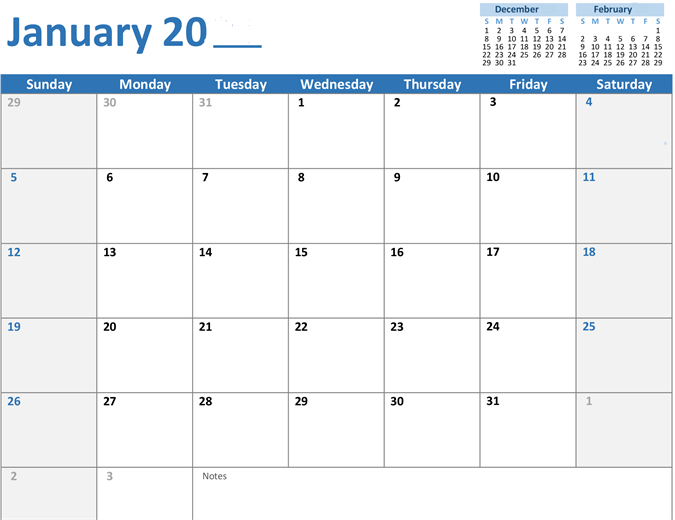
Calendar

Calendar

However, I realized that a Button object has some styling that makes it have a margin of 13px, which means that instead of having a grid like appearence, I would have a number of rectangles on the screen.  There was no obviuos way to remove this margin, until I finally stumbled upon a solution.

The first step is to realize that there are no attributes for the button that can be changed in the XAML. What actually needs to be done is to create a new style for the Button objects. This is actually rather easy and can be done from either Visual Studio or Blend. Just right click an existing Button object and choose Edit template -> Edit a copy. This will insert a large chunk of XAML code into  your project. In this generated code, search for the Border element. It will have an attribute Margin="{StaticResource PhoneTouchTargetOverhang}". Change that to Margin="0" and you will have a Button style with no margins. Now, that by itself is not enough (did you think this would be easy?) No, now you have to apply the style to an actual Button:

<Button Content="Button" Style="{StaticResource ButtonStyle1}"/>

In this case, the name of the style is ButtonStyle1. Now you should have a fully functioning button, without any empty space around it. If you need more buttons in the same style, just add the style attribute to them.

Follow me on twitter here.

Tagged , , ,

On Tracking Systems

Almost everywhere I have worked, there has been some kind of issue tracking software in use. And almost as often, it was disliked by most, if not all, users, due to missing or lacking functionality and awkward imposed workflows. But I will never take that position again, as I’ve recently experienced something worse: working with no tracking whatsoever.

I am pragmatic (who isn’t?). I adapt to the circumstances and make the best of the situation. That’s why I didn’t react negatively at first when I started at a recent assignment where no tracking software was used. I was taking over after a previous employee left and I inherited the grand title of Technical Team Lead. This meant keeping track of what needed to be done, how it should be done, and who should do it. My predecessor left me a Word document, named Backlog.doc. It contained a list of all issues in the project. There were seven columns: Task Number, Task Description, Priority, Assignee, Status, Domain, and Comments. I was less than thrilled by this and my first point of action, after verifying that there really was no tracking software in use, was to convert this Word document to an Excel spreadsheet. Not that much better, but at least I now could sort tasks by priority and status without too much trouble. Had this been a long term assignment, I probably would have tried to influence the organization to change their ways, but this was short term and I knew that I would never get anything up and running before I was leaving. This was a rather small project so we managed to get by using the Excel solution but it got me thinking about why we use tracking software.

I realized after a couple of weeks in the project that the centralized task list put a lot of pressure on me and that it made me a single point of failure – if I called in sick or went on vacation, I either needed to e-mail the task list to someone else in the team or simply hope that everybody knew what to do anyway.
It made day-to-day harder – I needed to personally check who was doing what and check their progress.
It also made accountability harder – who’s done what?
The tasks themselves became rather unclear and not concise enough to use them as single tasks. Many tasks grew over time and commenting was limited.
Duplicate tracking was cumbersome.

All of the above are things that wouldn’t necessary be solved by having some tracking software, but it sure would have made it easier.
I would have the option to create a task, assigning it to a team member, and follow up after a certain amount of time to make sure that they were making progress. I could have delegated creation of tasks to team members with domain knowledge, thereby minimizing the risk of factual errors in a task due to misunderstandings. I could probably have looked at statistics to determine our progress. And most important, instead of spending time updating an Excel spreadsheet that was out of date at about the same time I clicked “Save”, I could have used that time to ensure we were building a better product.


Follow me on twitter here.